

Welcome Matrice Pilots!
Join our free DJI Matrice community today!
Sign up

Smart 3D Capture Route from photos in album

Joined
Mar 17, 2025
Messages
3
Reaction score
0
Age
35
Hi,
has anyone created a 3D capture route from photos of a previous flight on the controller? Is this even possible or am I misinterpreting 1 (see attached screenshot)? I can't properly test this since I do not own a Matrice 4 (only a Mavic 3E and a RC Plus 2). If this is possible, which files need to be in which folder on the RC?

Thank you in advance!
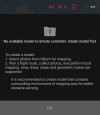
1000031375.jpg
 
On Youtube, find this video "

Drone Mapping 101: Smart 3D Capture Complete Workflow" and goto the 2:00 mark.​

Is this what you are talking about?
 
  • Like
Reactions: honkihonk
On Youtube, find this video "

Drone Mapping 101: Smart 3D Capture Complete Workflow" and goto the 2:00 mark.​

Is this what you are talking about?
Thanks. This answers my first question. Must've missed it the first few times I watched that video. I still don't know which files need to be in the Pilot Album folder. When I put photos from a smart oblique capture from a Mavic 3E in there, the photos are visible M4E-Pilot2-app, but not in a folder (no matter whether I put one in) and I can't do anything with them.
 
I am not sure if M3E images would work, they might, they might not.

Maybe tackle your problem using Flight Hub 2.
Upload the M3E images to Flight Hub 2 and Flight Hub 2 can also create the point cloud.

I will try to test this. I have access to an M3E and own a M4E.
 
Does the RC Plus 2 even work with the M3E? I thought they had different Occusyncs.


I tried some tests.

I placed M3E images on an SD card and placed it in my M4E.
The folder would not show on the controller. So I cannot use them to make the Local 3D point cloud.

Next I tried this in Flight Hub 2.

I uploaded a folder of M3E images.
I then used Flight Hub 2 to generate the Local 3D point cloud.
It worked great.

Next I tried to design a Smart 3D capture.
It would not allow me to choose the M3E.
It would only allow the M4E, M4D and M400 with P1 to do Smart capture.


Do you happen to use Metashape Pro for processing?
It's Flight Planner does pretty much the same thing, but you would need a laptop in the field to do the initial processing of a low resolution 3D mesh.
I prefer the Agist Flight Planner even with the added step.
 

Attachments

  • 1768450729731.png
    1768450729731.png
    95 KB · Views: 3
Does the RC Plus 2 even work with the M3E? I thought they had different Occusyncs.


I tried some tests.
Thank you for these quite extensive tests!

You are correct in that the RC Plus 2 does not work with the M3E. Further I am aware the M3E does not execute unmoddified 3D-routes.
I can't use flighthub 2 in this capacity since I don't have a paid licence because I purchased the M3E used. I do see my M3E photos in the Pilot 2 (M4E) app on my phone when put into the Pilot Album folder, but I can't use the to generate a route and they don't show up in a folder but as individual photos.

What is ultimately my goal:
Install the Pilot 2 apk I got from a used RC Plus 2 on the RC Pro for the M3E. Might need to use anscript that reinstalls with each boot up since "non compatible" DJI Apps get uninstalled with each power off.
Then fly an area route with the M3E and put these photos in the correct folder. Then generate a rough point cloud an a 3D route. Then modify this routes kmz (wpml) file to work with the M3E with a script. I have done this on PC already but to use M3E routes with the consumer M3.

Maybe I can get my hands on a M4E sample. Tje db files in the folder or elsewhere in the installation location need to be modified aswell to make Pilot 2 "think" they are from a M4E.
 

Members online

No members online now.

Forum statistics

Threads
3,006
Messages
26,404
Members
6,211
Latest member
Tlaw