


- Joined
- Jul 21, 2025
- Messages
- 1
- Reaction score
- 0
- Age
- 32
Hello all M300/M350 and Zenmuse L2 Pilots!
I've recently had a new issue come up with data captured by our Zenmuse L2 flown on an M300 or it might be an issue with DJI Terra.
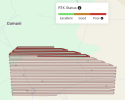
The issue: Poor RTK Status before processing data in DJI Terra.
Shows as red trajectory lines. DJI Terra says these trajectories come from the .RPT file in the mission folder. This file is present in all our missions.
The software: DJI Terra 4.30 - 4.4.0 - 4.5.0 - 5.0.0
What changed: We have never seen a "Good" or "Poor" RTK status before. Its always been Excellent and green lines.
Effect of issue: None seemingly... We have completed one project last month which is the first project we noticed this issue with. The data processed fine and the accuracies were within expectation.
Is anyone else experiencing this and has it had any detrimental effect on your data? What could be causing it? And is there any solution for it?
Thanks all!
I've recently had a new issue come up with data captured by our Zenmuse L2 flown on an M300 or it might be an issue with DJI Terra.
The issue: Poor RTK Status before processing data in DJI Terra.
Shows as red trajectory lines. DJI Terra says these trajectories come from the .RPT file in the mission folder. This file is present in all our missions.
The software: DJI Terra 4.30 - 4.4.0 - 4.5.0 - 5.0.0
What changed: We have never seen a "Good" or "Poor" RTK status before. Its always been Excellent and green lines.
Effect of issue: None seemingly... We have completed one project last month which is the first project we noticed this issue with. The data processed fine and the accuracies were within expectation.
Is anyone else experiencing this and has it had any detrimental effect on your data? What could be causing it? And is there any solution for it?
Thanks all!
Last edited: