DJI TAT (Thermal Analysis Tool) makes good, simple reports if you have to do quantitative analysis.
If you want eye candy, you can make an orthomap. The map can be radiometric (having temperature values) or nonradiometric.
If you want radiometric I only know of three main stream solution with traditional photogrammetry, Agisoft Pro, Pix4Dmapper and Drone Deploy. If you go with Agisoft and Pix4D, you will need to convert the proprietary DJI RJPGs to grayscale TIFF. There is a free app out there from a guy named Miro Rava that works great. He has even updated it for the Matrice 4T.
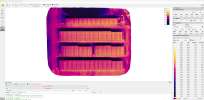
I recently ran a dataset where I flew nadir, single grid with the aircraft locked facing the same orientation as the solar panels. It came out good in both Agisoft and Pix4Dmapper, but Pix4D was the better output.
Pix4Dmapper, Index Map. Every pixel contains a temperature value. You can change thermal parameters in the TIFF conversion software such as emissivity, TRFlec and some others.
View attachment 31319
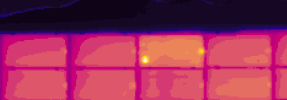
The temperature values from the index map and DJI Thermal Analysis Tool were very similar for quantitative analysis.
Pix4Dmapper got maximum 136 degrees F for this anomaly.