
Hello everyone, how are you guys doing? 
First time posting here as I’m preparing my first serious survey-grade mapping project with the Matrice 4E and would really greatly appreciate feedback from those with more field experience. I tried to sum up all of the details as concisely as possible, so please bear with me! My goal is to do this "by the books" and skip the guessing work. Thank you so much )
Would you:
A) Run Smart Oblique at 25° in one combined mission
OR
B) Fly two separate missions:
Is there a geometric advantage in separating them for block strength, or is Smart Oblique sufficient for a 13.2 ha site? Or would you do it in a different way, according to your experience? As to you, does smart oblique keep the data distortion free, or is there an issue while processing, in terms of scale or anything else? NADIR + oblique.
I use Agisoft Metashape Pro.
The ~10% GSD difference between nadir and oblique -
could that introduce any scale inconsistency or vertical bias?
My understanding is that bundle adjustment normalizes scale during processing, so this should not cause measurable distortion — but I’d appreciate confirmation from those who’ve tested it.
Currently considering:
Goal is improved Z stability and edge reconstruction, not full 3D facade modeling.
Is 30 cm sufficient at 1.5 cm GSD, or would you go 40 cm for safer marking? I'll use these checkpoints for comparison with my colleagues terrestrial measurements.
Some existing survey marks are located on curbs.
Concern:
Or would you recommend placing checkpoints on fully flat pavement instead?
There is a small body of water in the middle and tree clusters
So I expect:
Would Smart Oblique at 25° meaningfully improve canopy density, or is it marginal for this scale?
Did you ever use a ND filter, did it help? Or did it make the shutter speed alot worse?
Currently limited to 8GB VRAM, which may struggle with dense cloud processing at this overlap and image count.
I know it's a stretch and taking it for granted but I have to ask:
Wondered if anyone would be willing to help me process the dataset. BUT, it would be 4600 images...
I would be EXTREMELY grateful. Planning to upgrade workstation soon if all goes to plan!
This is my first major professional project and I want to avoid rookie mistakes or guesswork as much as possible. And deliver accurate results that I can stand behind.
Any critique, parameter adjustments, or workflow advice is highly appreciated.
Thank you everyone, in advance. Very grateful to discuss with all of you!
Wish everyone a productive week!
Mladen
First time posting here as I’m preparing my first serious survey-grade mapping project with the Matrice 4E and would really greatly appreciate feedback from those with more field experience. I tried to sum up all of the details as concisely as possible, so please bear with me!
My goal is to do this "by the books" and skip the guessing work. Thank you so much )Project Overview
- Waste water treatment facility (planned)
- Area: 13.2 ha (encompassing a bit more than the cadastral map just for the sake leeway/accuracy in post)
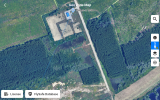
- Mixed terrain: mostly flat ground along with some hilly terrain, a few vertical objects, trees, and a small body of water in the center. Photo attached.
- Goal: high-quality orthomosaic + DSM + dense point cloud (maybe even 3D export)
- Deliverable standard: near survey-grade or maximum possible (cm-level accuracy)
Flight Parameters (Current Plan)
Altitude:
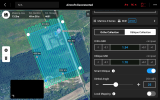
- 57.3 m AGL
Overlap:
- 85% front
- 80% side
- Estimated flight time: ~50 min (single grid)
GSD:
- Nadir: 1.54 cm/px
- Smart Oblique (25° gimbal): 1.70 cm/px
RTK:
- Enabled and Fixed.
- Logging RINEX
Main Questions
Smart Oblique vs Two Separate Flights
Would you:
A) Run Smart Oblique at 25° in one combined mission
OR
B) Fly two separate missions:
- One pure nadir (-90°)
- One oblique grid (-65° to -70°)
Is there a geometric advantage in separating them for block strength, or is Smart Oblique sufficient for a 13.2 ha site? Or would you do it in a different way, according to your experience? As to you, does smart oblique keep the data distortion free, or is there an issue while processing, in terms of scale or anything else? NADIR + oblique.
I use Agisoft Metashape Pro.
GSD Difference (1.54 vs 1.70 cm)
The ~10% GSD difference between nadir and oblique -
could that introduce any scale inconsistency or vertical bias?
My understanding is that bundle adjustment normalizes scale during processing, so this should not cause measurable distortion — but I’d appreciate confirmation from those who’ve tested it.
 .
.
Optimal Oblique Angle
Currently considering:
- 25° oblique (≈ -65° gimbal pitch)
- 20° for terrain stability?
- 25° for balanced geometry?
- 30° for stronger intersection angles?
- Some vertical edges
- Curbs
- Tree boundaries
- Small water body
Goal is improved Z stability and edge reconstruction, not full 3D facade modeling.
GCP Plan
Planned:- 5 GCPs (4 perimeter + 1 center)
- 1–2 checkpoints
- 30 cm x 30 cm
- Black/white high contrast
- Expected pixel size:
- ~19 px in nadir
- ~17 px in oblique
Is 30 cm sufficient at 1.5 cm GSD, or would you go 40 cm for safer marking? I'll use these checkpoints for comparison with my colleagues terrestrial measurements.
Checkpoints on Curbs
Some existing survey marks are located on curbs.
Concern:
- With pure nadir, curb edge might not reconstruct cleanly.
- Could introduce marking bias if model smooths the edge.
Or would you recommend placing checkpoints on fully flat pavement instead?
 Trees & Water
There is a small body of water in the middle and tree clusters
So I expect:
- Weak reconstruction over water (acceptable)
- Possible canopy gaps
Would Smart Oblique at 25° meaningfully improve canopy density, or is it marginal for this scale?
Did you ever use a ND filter, did it help?
Or did it make the shutter speed alot worse?Processing Constraint
Currently limited to 8GB VRAM, which may struggle with dense cloud processing at this overlap and image count.
I know it's a stretch and taking it for granted but I have to ask:
Wondered if anyone would be willing to help me process the dataset. BUT, it would be 4600 images...
I would be EXTREMELY grateful. Planning to upgrade workstation soon if all goes to plan!
My Objective
This is my first major professional project and I want to avoid rookie mistakes or guesswork as much as possible. And deliver accurate results that I can stand behind.
Any critique, parameter adjustments, or workflow advice is highly appreciated.
Thank you everyone, in advance. Very grateful to discuss with all of you!
Wish everyone a productive week!
Mladen