

You are using an out of date browser. It may not display this or other websites correctly.
You should upgrade or use an alternative browser.
You should upgrade or use an alternative browser.
M4T RTK accurate or not ..
- Thread starter Mflyer
- Start date
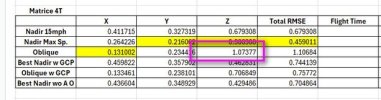
I refer to this test
Test 1 Nadir Images with Altitude Optimization, 5 Check Points, No GCPs.
X: 3.14 cm, Y: 1.95 cm, Z: 8.14 cm Total: 8.93 cm
Test 2 Smart Oblique, 5 Check Points, No GCPs and we have a winner!
X: 1.98 cm, Y: 1.98 cm Z: 3.26 cm Total: 4.29 cm
Test 1 Nadir Images with Altitude Optimization, 5 Check Points, No GCPs.
X: 3.14 cm, Y: 1.95 cm, Z: 8.14 cm Total: 8.93 cm
Test 2 Smart Oblique, 5 Check Points, No GCPs and we have a winner!
X: 1.98 cm, Y: 1.98 cm Z: 3.26 cm Total: 4.29 cm

I would consider that result, i.e that the smart oblique was better, as an anomaly comparing it to all of the other tests. Not the standard. Your own text confirmed that the nadir set produced better results. You need not take my word for it. Do a dozen more tests on your own and confirm it for yourself.
Thank you. This is because oblique images (from Smart oblique) "confuse" more the photogrammetric process than just a few obliques in the "elevation optimizatione" mode ? Would it be better using the M4E ?I would consider that result, i.e that the smart oblique was better, as an anomaly comparing it to all of the other tests. Not the standard. Your own text confirmed that the nadir set produced better results. You need not take my word for it. Do a dozen more tests on your own and confirm it for yourself.
I'm not sure as to the "why". It may be that there are more variables for the processor to deal with using obliques compared to nadir images. Less similarity between potential tie points for example. But I don't really know.
Over all, the M4E would be a better platform if topography is the goal. If all else is the same, position accuracy, and image time stamping, etc., the M4E has a global shutter. But no thermal, obviously.
Over all, the M4E would be a better platform if topography is the goal. If all else is the same, position accuracy, and image time stamping, etc., the M4E has a global shutter. But no thermal, obviously.
Thanks for sharing the accuracy Test of M4T. I also own M4T and I've done a simple test too but I don't know where I am wrong.
I carried out a RGB survey using the M4T with RTK, without using GCPs. Instead, I used check points to validate the model. However, I’m observing a vertical (Z) offset of about 20 cm. The mission was flown using Smart Oblique mode, with 1 nadir and 4 oblique at 45°. Accuracy is fine in X e Y (3 or 4 cm).
Interestingly, when I repeat the mission using nadir-only images with “elevation optimization” enabled, the offset drops to around 5 cm on the same check points.
I’m struggling to understand the reason behind this difference.
Any insights would be greatly appreciated. Thanks in advance!
I used the Smart Oblique where the drone takes several images for each position, a nadir and several obliques.
You used the 5 Flight Lines Oblique.
What software are you using for processing?
And I don't really have any insights yet as I am still testing by trying to map different areas.
When I run the data in Agisoft Pro, Pix4Dmapper and Drone Deploy, the results are very similar.
The 4E is going to be the better mapping drone period. The camera is much better in every aspect. Its just providing the photogrammetry software with more and better information in each image.Thank you. This is because oblique images (from Smart oblique) "confuse" more the photogrammetric process than just a few obliques in the "elevation optimizatione" mode ? Would it be better using the M4E ?
I still have to map 2 more areas, at school and my beach project. I will try to have the 4T map both to see how it fares.
I really would like to know from DJI engineers why the 4T fares worse in mapping. It seems like it is something more than just the mechanical shutter. The Autel Evo 2 with RTK module obtained survey grade results and lacked a mechanical shutter.
Also the wording from DJI on mapping with both leaves me scratching my head, "DJI Matrice 4E supports precise mapping after enabling RTK function. Equipping DJI Matrice 4T with the RTK module can’t guarantee the final precision."
It says equipping the 4T with an RTK module even though it is permanently affixed.
I just checked, the M4T's camera is not calibrated as Agisoft does not prepopulate the camera calibration, while the M4E does. But when I ran my tests, I did not use this information. I am rerunning the M4E at 15mph nadir with Altitude Opt using the precalibration for the camera to see what it does.
I used the 5-direction mission because the single-direction (with several images on the same position) was moving too far away from the area of interest, and honestly I don't why (maybe to obtain better results in Z?).I used the Smart Oblique where the drone takes several images for each position, a nadir and several obliques.
You used the 5 Flight Lines Oblique.
What software are you using for processing?
And I don't really have any insights yet as I am still testing by trying to map different areas.
When I run the data in Agisoft Pro, Pix4Dmapper and Drone Deploy, the results are very similar.
In any case, I’ll run some additional tests to better understand the differences between the two approaches.
Thank you for your input. I really appreciate it.
Of course, the M4T is not designed specifically for mapping and it definitely can’t operate at the same altitude (for the same GSD) and speed as the M4E. However, with a few adjustments, such as reducing flight speed and flying at a lower altitude, it’s still possible to achieve interesting mapping results with a good GSD. That said, I believe it’s always best practice to use ground control points (GCPs) and include additional check points for proper validation.The 4E is going to be the better mapping drone period. The camera is much better in every aspect. Its just providing the photogrammetry software with more and better information in each image.
I still have to map 2 more areas, at school and my beach project. I will try to have the 4T map both to see how it fares.
I really would like to know from DJI engineers why the 4T fares worse in mapping. It seems like it is something more than just the mechanical shutter. The Autel Evo 2 with RTK module obtained survey grade results and lacked a mechanical shutter.
Also the wording from DJI on mapping with both leaves me scratching my head, "DJI Matrice 4E supports precise mapping after enabling RTK function. Equipping DJI Matrice 4T with the RTK module can’t guarantee the final precision."
It says equipping the 4T with an RTK module even though it is permanently affixed.
I just checked, the M4T's camera is not calibrated as Agisoft does not prepopulate the camera calibration, while the M4E does. But when I ran my tests, I did not use this information. I am rerunning the M4E at 15mph nadir with Altitude Opt using the precalibration for the camera to see what it does.
Thank you for the comparison tests you’re carrying out between the M4E and M4T. Let us know your results.
I reran the M4E now using the prepopulated camera calibration and the results in RMSE were about the same.
Also the adjusted camera calibration was about the same, so Agisoft ended up with a very similar camera calibration on its own, without using DJI's calibration as a starting point. Alexy from Agisoft recommends not using the prepopulated camera calibration so that is how i process it.
Agisoft also updated their FreshDesk instructionals and now has camera calibration recommendations for the M4E.
Also the adjusted camera calibration was about the same, so Agisoft ended up with a very similar camera calibration on its own, without using DJI's calibration as a starting point. Alexy from Agisoft recommends not using the prepopulated camera calibration so that is how i process it.
Agisoft also updated their FreshDesk instructionals and now has camera calibration recommendations for the M4E.

Agisoft Help Desk.Thanks for sharing. Could you share the link where I can find this information? Is there anything similar for the M4T? Thank you.
I have not noticed anything on the T.

DJI with RTK coordinates data processing
In this article, we describe how to process DJI drone images with RTK data in Agisoft Metashape Professional. Using RTK coordinates of camera locations provides more accurate results, even when no GCPs are utilized. The main steps and our recomm...
 agisoft.freshdesk.com
I ran another dataset for the T.
This time at school I mapped the archery field.
Again it is a flat area with grass fields.
I tried Nadir with Altitude Optimization, Double Oblique 60 degrees and Smart Oblique.
Smart Oblique again stole the show with Double Oblique being a horrible showing for me.
Smart Oblique, 190 ft AGL. 5 Check Points, No GCPs and Recieving corrections from a base with too long baseline of 31 km. I did not have time to setup a local base.
This time at school I mapped the archery field.
Again it is a flat area with grass fields.
I tried Nadir with Altitude Optimization, Double Oblique 60 degrees and Smart Oblique.
Smart Oblique again stole the show with Double Oblique being a horrible showing for me.
Smart Oblique, 190 ft AGL. 5 Check Points, No GCPs and Recieving corrections from a base with too long baseline of 31 km. I did not have time to setup a local base.
| X |
| Y |
| Z |
| Total |
[td width="48pt"]
3.44 cm
[/td][td]
3.18 cm
[/td][td]
4.95 cm
[/td][td]
6.82 cm
[/td]Do you use the rolling shutter compensation option (Camera Calibration → Rolling Shutter Compensation -> Full Txyz Rxyz)? I’ve noticed that with rolling shutter compensation ON, I get a vertical offset of about 20 cm, whereas with it OFF, the offset is around 6 cm (which seems normal). Is it possible that rolling shutter compensation is causing this offset?I ran another dataset for the T.
This time at school I mapped the archery field.
Again it is a flat area with grass fields.
I tried Nadir with Altitude Optimization, Double Oblique 60 degrees and Smart Oblique.
Smart Oblique again stole the show with Double Oblique being a horrible showing for me.
Smart Oblique, 190 ft AGL. 5 Check Points, No GCPs and Recieving corrections from a base with too long baseline of 31 km. I did not have time to setup a local base.
X Y Z Total
[td width="48pt"]
3.44 cm
[/td]
[td]
3.18 cm
[/td]
[td]
4.95 cm
[/td]
[td]
6.82 cm
[/td]
I used it on the previous tests, and it did not change the results enough to comment much on.Do you use the rolling shutter compensation option (Camera Calibration → Rolling Shutter Compensation -> Full Txyz Rxyz)? I’ve noticed that with rolling shutter compensation ON, I get a vertical offset of about 20 cm, whereas with it OFF, the offset is around 6 cm (which seems normal). Is it possible that rolling shutter compensation is causing this offset?
The vertical offset in the Smart Oblique is within a range that I would expect it to be.
I've run the previous sets in Pix4Dmapper and Drone Deploy. The results were all very close.
I am pretty happy with the Agisoft workflow and settings that I will use in the future.
I am going to wrap up this assessment with a final test.
This will be PPK.
I will PPK the data from both a local base, my a bit too far RTK service (31 km) and will test out a Rock Robotic RTK base that is 6 km away.
Both the images and the check points will be PPK'ed.
I will use Red Tool Box and will try to process in Agisoft, Pix4Dmapper and Drone Deploy. I may try out Drone Deploy's new auto PPK process to see how it fares.
This will be PPK.
I will PPK the data from both a local base, my a bit too far RTK service (31 km) and will test out a Rock Robotic RTK base that is 6 km away.
Both the images and the check points will be PPK'ed.
I will use Red Tool Box and will try to process in Agisoft, Pix4Dmapper and Drone Deploy. I may try out Drone Deploy's new auto PPK process to see how it fares.
Do you think that enabling rolling shutter compensation with full Txyz and Rxyz parameters might improve the model results, even if it introduces a Z offset?I used it on the previous tests, and it did not change the results enough to comment much on.
The vertical offset in the Smart Oblique is within a range that I would expect it to be.
I've run the previous sets in Pix4Dmapper and Drone Deploy. The results were all very close.
I am pretty happy with the Agisoft workflow and settings that I will use in the future.
Next, I will try Smart Oblique (with more images over the same area).
I tried the rolling shutter for the last dataset. It did nothing worth reporting.
My Z offset was within where I would want it. Z is almost always the worse.
The T is not sold by DJI as a mapping solution, and its to me, surprisingly good results are just a bonus. It is my thermal solution that can map with minimal GCPs.
At my real job in public safety we will try:
At my side job at school we will:
My Z offset was within where I would want it. Z is almost always the worse.
The T is not sold by DJI as a mapping solution, and its to me, surprisingly good results are just a bonus. It is my thermal solution that can map with minimal GCPs.
At my real job in public safety we will try:
- Test out the Matrice 4T for accident scene reconstruction. It should work pretty good and will serve as backup to the Mavic 3E. On this use case we are looking for relative accuracy over absolute. But the Mavic 3E has the better camera and will remain the drone we grab first.
- The Mavic 3E will remain our beach mapping solution. I still like its images better than the 4E. The 4E compresses the JPEGs too much. I think this was done for faster uploading into Flight Hub 2. The Mavic 3E still consistently outperforms the 4E in accuracy assessment.
- The 4E will be our 3D modeling solution. The Smart Local 3D mode workflow is quick and creates ultra realistic models. This could be for accident scenes too but will be used for smaller scenes.
At my side job at school we will:
- Try to obtain independent funding to obtain a 4T. All grants now prohibit purchasing DJI drones.
- It can be used for several different classes such as Remote Sensing, Data collection and similar
- Use it both for mapping, 3D models and its thermal abilities
- Use it to teach autonomous flights. There are so many useful flight modes now.
- Use it for teach photovoltaic inspections/roof moisture inspections and maybe even some electrical assessments (We are limited in training props for this)
Thank you for your suggestions. Do you usually use rolling shutter correction with full Txyz and Rxyz parameters when processing data from the Matrice 4T ?I tried the rolling shutter for the last dataset. It did nothing worth reporting.
My Z offset was within where I would want it. Z is almost always the worse.
The T is not sold by DJI as a mapping solution, and its to me, surprisingly good results are just a bonus. It is my thermal solution that can map with minimal GCPs.
At my real job in public safety we will try:
- Test out the Matrice 4T for accident scene reconstruction. It should work pretty good and will serve as backup to the Mavic 3E. On this use case we are looking for relative accuracy over absolute. But the Mavic 3E has the better camera and will remain the drone we grab first.
- The Mavic 3E will remain our beach mapping solution. I still like its images better than the 4E. The 4E compresses the JPEGs too much. I think this was done for faster uploading into Flight Hub 2. The Mavic 3E still consistently outperforms the 4E in accuracy assessment.
- The 4E will be our 3D modeling solution. The Smart Local 3D mode workflow is quick and creates ultra realistic models. This could be for accident scenes too but will be used for smaller scenes.
At my side job at school we will:
- Try to obtain independent funding to obtain a 4T. All grants now prohibit purchasing DJI drones.
- It can be used for several different classes such as Remote Sensing, Data collection and similar
- Use it both for mapping, 3D models and its thermal abilities
- Use it to teach autonomous flights. There are so many useful flight modes now.
- Use it for teach photovoltaic inspections/roof moisture inspections and maybe even some electrical assessments (We are limited in training props for this)
Mapping should be as clean as possible. Software interventions may just give more inaccurate results. This thread showed several 4T outcomes which prove that the 4T is a very capable drone. It all comes down to testing (which I need to do more myself) and finding your workflow to validate results.Thank you for your suggestions. Do you usually use rolling shutter correction with full Txyz and Rxyz parameters when processing data from the Matrice 4T ?
Thanks to Jaja6009, we have some good pointers to test out ourself and compare results. To me, absolute X and Y are the ones that matter. Z is always all over the place

Similar threads
- Replies
- 6
- Views
- 2K
- Replies
- 1
- Views
- 3K
- Replies
- 3
- Views
- 1K
- Replies
- 0
- Views
- 4K