
Thank you very much,I do not have any special settings for Agisoft Pro.
Align Photos: Default, Accuracy High, Key Point Limit 40,000, Tie Point Limit 4,000
After Alignment I import and mark the control points. Then assign each control point as a GCP or Check Point. Update Transform, then run Optimization.
For Optimization I use check all parameters except for the following. If using the Matrice 4E I leave out K4. If using GCPs I leave out b1 and b2. If using the Matrice 4E and using GCPs I leave out K4, b1 and b2. This is from Agisoft Freshdesk. I really need to read up more on these so that I can make choices based on full understanding more than just following suggestions.
I then remove points using Gradual Selection/Clean Tie Points. I follow the USGS workflow and try to do this: Reconstruction Uncertainty 10 or 50%, Projection Accuracy 3 or 50% and Reprojection Error 0.3 or 10%.
After each step above, I run Optimization as described above.
From there It's just running each step.
Pix4Dmapper does not have a ton of options for processing. If I am using RTK I will choose the Accurate Geolocation and Orientation Option in Calibration. For Image Scale I leave it at Full unless it is a challenging dataset with a lot of trees or fields. Pix4Dmapper and matic are more press and go type software than Agisoft.
It seems to me that they are the parameters I usually use, it's just that the Accuracy High, Key Point Limit 40,000, Tie Point Limit 4,000 are different.
It is a whole process of adjusting according to what I am going to do, still a lot to learn and find the correct configuration.
I only place the GCPs at the end, since they are not made with an RTK base, I just use them as a reference.
For the optimization, I think I have used the same parameters but I have changed them according to what I was trying to do, and finally the thing about remove points using Gradual Selection/Clean Tie Points I'm not sure if I have done it so I need to check.
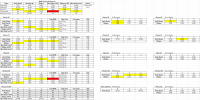
In any case, here I put a link so you can see a mapping that I have been doing several times as monitoring of the progress of the works, save the image so you can use zoom to see more details.
Tell me what you think.

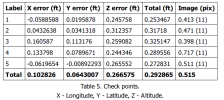
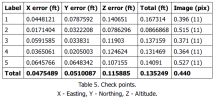

 Great work
 . Perhaps the next step would be to see how it performs in the thermal area. Personally, I haven't created 3D models with the IR camera with good results, only orthomosaics. I need more models/objects where I can create a good 3D model and learn to discover the best options.