
Welcome Matrice Pilots!
Join our free DJI Matrice community today!
Sign up

M4T RTK accurate or not ..

I used it on the previous tests, and it did not change the results enough to comment much on.

The vertical offset in the Smart Oblique is within a range that I would expect it to be.

I've run the previous sets in Pix4Dmapper and Drone Deploy. The results were all very close.

I am pretty happy with the Agisoft workflow and settings that I will use in the future.
Do you think that enabling rolling shutter compensation with full Txyz and Rxyz parameters might improve the model results, even if it introduces a Z offset?

Next, I will try Smart Oblique (with more images over the same area).
 
I tried the rolling shutter for the last dataset. It did nothing worth reporting.

My Z offset was within where I would want it. Z is almost always the worse.

The T is not sold by DJI as a mapping solution, and its to me, surprisingly good results are just a bonus. It is my thermal solution that can map with minimal GCPs.


At my real job in public safety we will try:

  • Test out the Matrice 4T for accident scene reconstruction. It should work pretty good and will serve as backup to the Mavic 3E. On this use case we are looking for relative accuracy over absolute. But the Mavic 3E has the better camera and will remain the drone we grab first.
  • The Mavic 3E will remain our beach mapping solution. I still like its images better than the 4E. The 4E compresses the JPEGs too much. I think this was done for faster uploading into Flight Hub 2. The Mavic 3E still consistently outperforms the 4E in accuracy assessment.
  • The 4E will be our 3D modeling solution. The Smart Local 3D mode workflow is quick and creates ultra realistic models. This could be for accident scenes too but will be used for smaller scenes.

At my side job at school we will:

  • Try to obtain independent funding to obtain a 4T. All grants now prohibit purchasing DJI drones.
    • It can be used for several different classes such as Remote Sensing, Data collection and similar
    • Use it both for mapping, 3D models and its thermal abilities
    • Use it to teach autonomous flights. There are so many useful flight modes now.
    • Use it for teach photovoltaic inspections/roof moisture inspections and maybe even some electrical assessments (We are limited in training props for this)
 
  • Like
Reactions: Ro3go and DesmoMito
I tried the rolling shutter for the last dataset. It did nothing worth reporting.

My Z offset was within where I would want it. Z is almost always the worse.

The T is not sold by DJI as a mapping solution, and its to me, surprisingly good results are just a bonus. It is my thermal solution that can map with minimal GCPs.


At my real job in public safety we will try:

  • Test out the Matrice 4T for accident scene reconstruction. It should work pretty good and will serve as backup to the Mavic 3E. On this use case we are looking for relative accuracy over absolute. But the Mavic 3E has the better camera and will remain the drone we grab first.
  • The Mavic 3E will remain our beach mapping solution. I still like its images better than the 4E. The 4E compresses the JPEGs too much. I think this was done for faster uploading into Flight Hub 2. The Mavic 3E still consistently outperforms the 4E in accuracy assessment.
  • The 4E will be our 3D modeling solution. The Smart Local 3D mode workflow is quick and creates ultra realistic models. This could be for accident scenes too but will be used for smaller scenes.

At my side job at school we will:

  • Try to obtain independent funding to obtain a 4T. All grants now prohibit purchasing DJI drones.
    • It can be used for several different classes such as Remote Sensing, Data collection and similar
    • Use it both for mapping, 3D models and its thermal abilities
    • Use it to teach autonomous flights. There are so many useful flight modes now.
    • Use it for teach photovoltaic inspections/roof moisture inspections and maybe even some electrical assessments (We are limited in training props for this)
Thank you for your suggestions. Do you usually use rolling shutter correction with full Txyz and Rxyz parameters when processing data from the Matrice 4T ?
 
Thank you for your suggestions. Do you usually use rolling shutter correction with full Txyz and Rxyz parameters when processing data from the Matrice 4T ?
Mapping should be as clean as possible. Software interventions may just give more inaccurate results. This thread showed several 4T outcomes which prove that the 4T is a very capable drone. It all comes down to testing (which I need to do more myself) and finding your workflow to validate results.

Thanks to Jaja6009, we have some good pointers to test out ourself and compare results. To me, absolute X and Y are the ones that matter. Z is always all over the place :-p
 
  • Like
Reactions: DesmoMito
Thank you for your suggestions. Do you usually use rolling shutter correction with full Txyz and Rxyz parameters when processing data from the Matrice 4T ?
I did the Rolling Shutter correction along with using the suggested Adaptive Camera Model per Agisoft's guidance and did not find it to have changed the outcome in any meaningful way worth reporting back to everyone other than to say I tried it and it did drastically change the outcomes.

I am happy with my processing decisions in Agisfot because I ran the data in both Pix4D and Drone Deploy. Both of these solutions have much less user input, so there are less ways to interfere. With both as we saw in the reported RMSE sheet, Pix4D and Drone Deploy were for the most part very similar in results.

Now to find a day to do the final tests. PPK and I will try to use a Local Base for the best possible outcomes.

My poor M4E also needs to get some flight time. I have been flying the 4T nonstop since I got it. The thermal sensor and IR Cut Filter make night flying a blast.
 
  • Like
Reactions: Ro3go and DesmoMito
I did the Rolling Shutter correction along with using the suggested Adaptive Camera Model per Agisoft's guidance and did not find it to have changed the outcome in any meaningful way worth reporting back to everyone other than to say I tried it and it did drastically change the outcomes.

I am happy with my processing decisions in Agisfot because I ran the data in both Pix4D and Drone Deploy. Both of these solutions have much less user input, so there are less ways to interfere. With both as we saw in the reported RMSE sheet, Pix4D and Drone Deploy were for the most part very similar in results.

Now to find a day to do the final tests. PPK and I will try to use a Local Base for the best possible outcomes.

My poor M4E also needs to get some flight time. I have been flying the 4T nonstop since I got it. The thermal sensor and IR Cut Filter make night flying a blast.
Within your busy schedule.. if you in any way find an opportunity, would you be willing to compare Agisoft numbers to Mipmap? Just curious : )
 
Within your busy schedule.. if you in any way find an opportunity, would you be willing to compare Agisoft numbers to Mipmap? Just curious : )
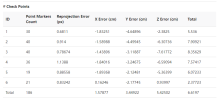
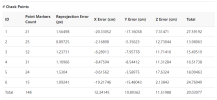
The M4T in Mip Map

All control points were Check Points.

2 of the points are much worse than the others, but I triple checked, they were marked correctly.

I do not have that extreme error on those points in Agisoft Pro.

The Results are very close though to Agisoft in Total RMSE even though this one fared much better in Z.

MipMap

1777249091698.png

Agisoft

1777249360423.png
 
  • Like
Reactions: Ro3go
The M4T in Mip Map

All control points were Check Points.

2 of the points are much worse than the others, but I triple checked, they were marked correctly.

I do not have that extreme error on those points in Agisoft Pro.

The Results are very close though to Agisoft in Total RMSE even though this one fared much better in Z.

MipMap

View attachment 31313

Agisoft

View attachment 31314

Very interesting. Thank you!
 
Interesting results here.

This was RTK. I will do the PPK for the same mission in the future.

It was the school's new baseball field. Again I am in New Jersey and there is not a lot of elevation change, so its limited elevation gain.


RTK Mission
5 Control Points Collected @ 2 minutes each from a base 31 km away. I know too far for RTK.
I made a known point then had the Emlid send corrections to the drone over Local NTRIP. This point was averaged from the 31 km away base for 10 minutes.

All points were used as Check Points.

The M4T was as good as the M4E in almost every test, even beating it using Smart Oblique.

Almost all of my personal tests using the M4E have shown that it is not as accurate as the Mavic 3E we use for beach mapping, hence why I still use the M3E for this purpose. When doing sand volume gain/loss the elevation is the most important aspect with 1 cm of error causing large errors in volume loss/gain.

Unfortunately all of my tests are at long baselines to the base. I am hoping for another test where I have 2 Emlids so that I can just setup on an NGS benchmark nearby and run a test with a very low baseline.

RMSE US S FtRMSE cm
M4T Nadir Alt Opt0.230.150.520.59 6.884.7215.9518.00
M4T Smart Obl0.260.100.140.31 7.842.904.309.40
M4E Nadir Alt Opt0.250.070.160.30 7.522.164.819.18
M4E Smart Obl0.270.080.150.32 8.112.524.489.60
 
  • Like
Reactions: Ro3go
Here is the results again, the copy and paste from Excel messed up.

US Survey Ft on the left and cm on the right.

1777578463854.png
 
  • Like
Reactions: Mflyer
Smart Oblique outcome is surprising.
Compared in flight time how much does it differ from trad Nadir? The amount of images would times 3 I guess ..
 
Images Taken

M4E
Nadir with Alt Opt - 140
Smart Oblique - 152


M4T
Nadir with Alt Opt - 142
Smart Oblique - 211

Please note, I did not use a dedicated KML, so the areas were hand marked and were of differing sizes. But you can gain insight for each drone against itself as far as the flight mode, but do not compare the drones against each other for this test.
For the original main test a dedicated KML was used so you can gain that insight on that test.
 
  • Like
Reactions: Ro3go and Mflyer
After analysing the flight tests, there's something that still doesn't add up for me in the results of the great work that jaja6009 has done.

First: when we talk about nadir, I assume we're referring to an orthomosaic.

Second: When we talk about smart oblique, the gimbal moves in several directions along the same flight path.

Third: When we talk about oblique, I assume it's when the mission is manually configurable and the 5 steps it performs, the first is nadir and the rest are oblique.

Based on this, I repeated what jaja6009 did using the same parameters: distance/area, altitude, and speed. I programmed the three missions with FlightHub2 to then import them from the cloud in the field.

To my surprise, after reviewing the configurations and starting the first smart oblique mission, I saw that the altitude and speed were no longer the same.

Smart oblique 4.2~15 m/s auto

Nadir 14.2 m/s with elevation optimization

Oblique 14.2 m/s no elevation optimization

I had set it as jaja6009 had done

Alt 63.6, ASL 60.4, which is what the controller showed.

Also, the number of photos per mission is much higher in my case

Oblique photos 326

Smart oblique 469

Nadir 225


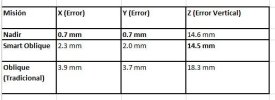
Only in the last mission did I modify the speed to what jaja6009 had stipulated [oblique]. Once the missions were finished, I processed the flights with Pix4dmapper, only the first step, and the results were: Quite accurate, see the photo.

Without GCP using NTRIP at a distance of 25km, RTK connection fixed.

Now my question: why are the results so different when the parameters are almost the same? Could geolocation influence the accuracy, or could RTK and satellite connections affect the same mission in different parts of the world, thus causing the M4T's interpretation/opinion to vary depending on the location?

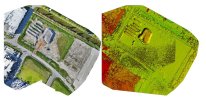
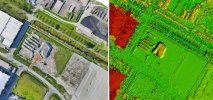
I also have to say that the terrain isn't as flat as jaja6009's, see photos and I'd like to know what parameters appear in the pix4dmapper photo editor. [x,y]

And finally, perhaps other M4T users could replicate what jaj6009 has well done for the good of the community.
 

Attachments

  • jajatest.JPG
    jajatest.JPG
    16.6 KB · Views: 4
  • nadir.JPG
    nadir.JPG
    104.1 KB · Views: 4
  • oblique.JPG
    oblique.JPG
    100 KB · Views: 1
  • smartoblique.JPG
    smartoblique.JPG
    95.7 KB · Views: 4
To clear up my tests.

Nadir was only images looking straight down. And I tested with the Altitude Optimization turned both on and off. Altitude Optimization is the last line of oblique images from the outside to the inside.

Oblique was using the Custom Camera option. I used 60 degrees and then flew a double grid by rotating the second mission 90 degrees from the initial mission.

When I changed the parameters I would go back and make sure the altitude was set the same for each mission and also the speed of the drone.

On the question of why the results are so different. You are comparing two different things. I was reporting the RMSE as compared to independently measured control points used as check points, not the math behind the outputs. When I look at the computed image locations on my outputs they too are in the mm range.

The best practice way to assessing absolute accuracy is to validate with check points. The software can come up with whatever values it wants to state for its relative accuracy and how well the outputs line up with the math in the various report sections but only check points tell the true story, the story if the outputs line up to their real locations on the Earth. When the software does not use check points, it is grading itself. With check points you are asking for an independent, second assessment.

Never expect your outputs to be better than the GSD of project with absolute accuracy. You expect 1 to 3 times the GSD. The only time I saw RMSE in the millmeters was with much higher end systems that used PPK, a Total Station to collect control points, using GCPs and a high-end photogrammetry camera that had its lens calibrated by a camera lab.

I have questions on DJI's lens calibration since all software I have used, have the optimized camera calibration not matching DJI's imported, initial calibration. Further when processing using DJI's or letting the software come up with it did not alter the results in the few tests I ran. Alexy from Agisoft always tells users to let Agisoft come up with the initial calibration and not to use DJI's.
 
  • Like
Reactions: Dave Pitman
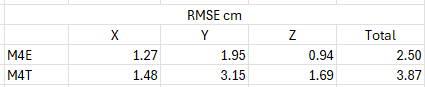
Okay, I finally got around to PPK on the second mission set on the school's new baseball field.

I only processed the Smart Oblique flights.

1778481952686.png

I applied PPK to the control points and again they were only used as check points.
I then applied PPK to the images.

I used a base from Rock RTK that was about 6 km away, so it was real close.

For me the question of accuracy/precision was answered with the first test I ran, but this cements it for me.
 

Attachments

  • 1778481893234.png
    1778481893234.png
    2.5 KB · Views: 2
I have questions on DJI's lens calibration since all software I have used, have the optimized camera calibration not matching DJI's imported, initial calibration.
From what I have read, very expensive lenses need to be calibrated over time and even for use when temperature and humidity vary by some margin from the previous calibration. I take DJI's calibration process as more of a quality control procedure at the point of manufacture rather than assuming that the calibration is good to go for the life of the drone. Agisoft's triangulation process likely provides a much more accurate snapshot of the lens parameters at the time of that flight.
 
  • Like
Reactions: jaja6009
Dave, I read the same thing about the calibrations.
I have tried the various low cost camera calibrations and did not see any results that make me want to continue to use those processes.

I have been wanting to change to PPK workflows, and this may be the final test that makes me do so.
Red Toolbox for the images and Emlid Studio for the control points were very easy to use and did not in anyway make the project more cumbersome. I just need to organize the various files better for the future.
 

Members online

No members online now.

Forum statistics

Threads
3,079
Messages
26,820
Members
6,372
Latest member
StoneHome